Usability · Web (desktop browser; Chrome recommended) · English
Retick — turn UI review videos into developer-ready tickets
By Patrick O'Shea · 0 completed reviews · 10 minutes
Volunteer reviews build your reputation, with no paid rewards. Feedback stays private to you and the product owner.
Anyone verified can start
Checking eligibility...
Sign in or create a free accountVisit product- Expected behavior
- A new user should understand what Retick does, create a free account, and find how to upload a review video or screenshot without assistance. After analysis, the user should be able to understand the extracted issues, verify their screenshots and severity, refine or annotate the feedback, and find the export options. Navigation, processing status, usage limits, and next steps should be clear. Please flag confusing labels, missing guidance, accessibility barriers, errors, or unexpected results.
- Intended audience
- Product managers, UX/UI designers, QA testers, developers, UX researchers, and agency teams who review digital products and need to turn visual feedback into actionable engineering tickets. First-time users and people who currently document feedback manually are especially welcome.
- Review tasks
- 1. Visit https://retick.io and explain, in your own words, what you think the product does and who it is for. 2. Create your own free account or sign in. Explore the dashboard and find where to start a review or upload media. 3. Upload a short UI review recording or screenshot that you own and are comfortable sharing. Describe one or two specific UI issues; avoid sensitive or confidential content. 4. Follow the processing status and inspect the extracted issues. Are the descriptions, screenshots, severity, and acceptance criteria accurate and useful? 5. Try editing an issue and adding an annotation, then locate the export options. Would the result be ready to hand to a developer? 6. Record a concise walkthrough of your experience, including any blockers, your top three improvements, and whether you would use Retick in your current workflow. If processing exceeds the review window, report the status rather than waiting indefinitely.
- Product access
- Start at https://retick.io. Choose Get Started or visit https://retick.io/login to create your own free account using Google or email. No shared credentials or payment details are needed for the free tier. Use your own non-sensitive sample recording or screenshot and stay within the displayed free-plan limits; no purchase or upgrade is required for this review. The Chrome capture extension is optional, not required. If you reach a limit or encounter a blocked step, describe it in your feedback and continue with the areas you can access. Return to this marketplace review to submit your feedback recording.
Use a public product or create your own free account. Never use shared passwords.
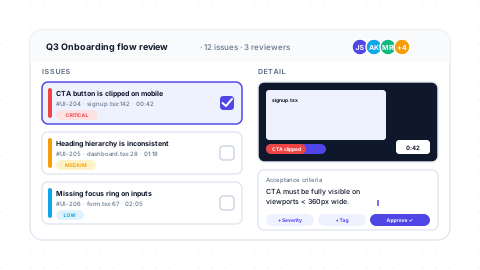
Retick helps product teams turn UI review videos, screenshots, and design feedback into structured, developer-ready tickets. Upload a recording or image, let AI extract issues with screenshots, severity, and acceptance criteria, then review, annotate, and export the results. We’re looking for honest usability feedback on the journey from first visit to a useful, actionable issue. Tell us what feels clear, what causes friction, and what would make Retick fit your workflow.